
First, you need to sign up and subscribe to the required plan to get access to the online software.
The online version of the classification software is a handy tool for quick analysis of your data. You have access to most of the features available in the desktop version, but there are limitations, too.
You can access the software here. If you don’t have an account, you will be redirected to the signup page.
The first page of the online classifier is shown in the following.

You can browse your data file, enter the sheet name, and your strategy to replace the intervals. Your features can be provided in intervals [min, max]. However, machine learning models require only one numeric value. You can decide what value to use instead of the interval, min or max.
In the second page, the software will show the variables, from which you can select the desired variables to build the models.

After selecting the variables, you will be provided with the list of models. The ANN is disabled, since it is not available in the online version. You select multiple models, but the number of models must be odd. In this manner, the final decision will be made based on the majority voting strategy.
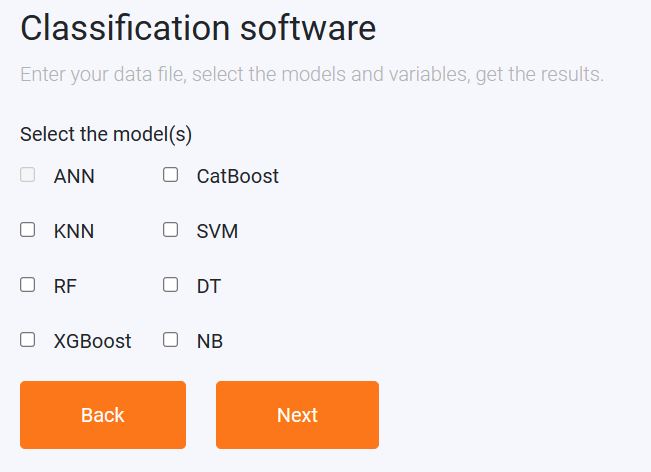
In the next page, you can review the settings, such as the filename, sheet name, replacing the intervals, input variables, and the selected models. By pressing next, training the models will begin. The software uses a 5-fold cross validation to tune the hyperparameters of the model. 85% of the data is used for training and 15% for testing. This can take a few minutes.
Then, you will pass on to the results page, where the classification metrics are shown. Also, there is a form to enter the characteristics of new candidates. The inputs as the same as the selected inputs upon which the model is built.
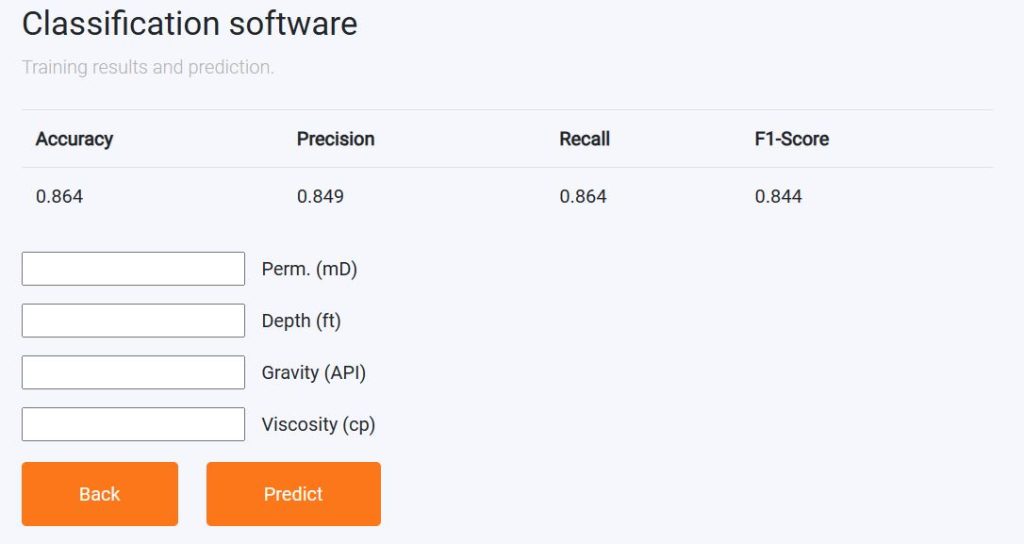
Now, you can provide the characteristics of the new sample and press “Predict” to get the prediction.
The prediction is the probability of the 5 most suitable class for the entered samples, shown as a bar chart.
